DeepLoad Malware - ClickFix Tactic Steals Browser Credentials
Basically, DeepLoad is a sneaky malware that steals your passwords using clever tricks.
A new malware called DeepLoad is using ClickFix tactics to steal browser credentials. This affects users who may unknowingly run malicious commands. The risk is significant as sensitive information can be compromised without detection.
What Happened
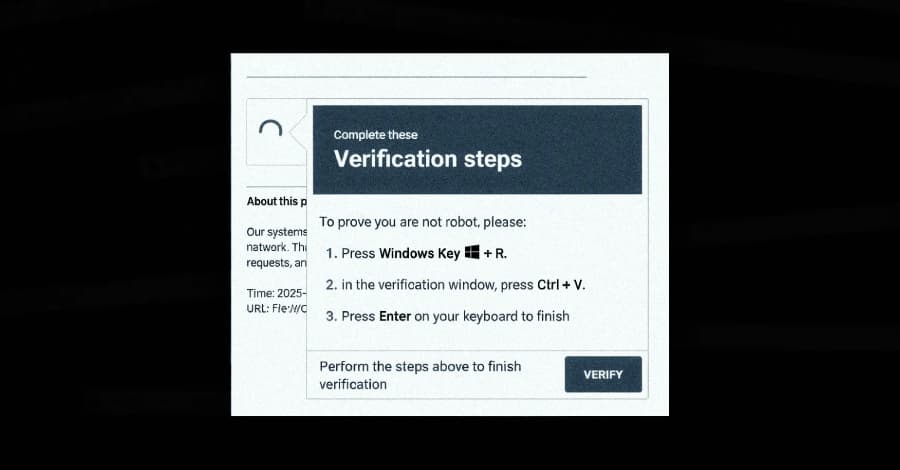
A new malware campaign has emerged, leveraging the ClickFix social engineering tactic to distribute a previously undocumented malware loader known as DeepLoad. This campaign tricks users into executing malicious PowerShell commands under the guise of fixing a non-existent issue. Researchers from ReliaQuest have highlighted that the malware employs AI-assisted obfuscation and process injection techniques to evade detection, starting its credential theft operations almost immediately.
The attack begins with a ClickFix lure, prompting users to paste a command into the Windows Run dialog. This action triggers mshta.exe, a legitimate Windows utility, to download and execute an obfuscated PowerShell loader. The loader is designed to hide its true functionality among meaningless variable assignments, making it difficult for security tools to identify its malicious intent.
Who's Being Targeted
The primary targets of DeepLoad are users who may inadvertently run the malicious commands. Once executed, the malware blends in with regular Windows activity, disguising itself within the legitimate process LockAppHost.exe, which manages the lock screen. This stealthy approach helps it avoid detection by security software, allowing it to operate undetected on infected systems.
DeepLoad's design includes features that facilitate credential theft by extracting passwords from browsers. It also installs a malicious browser extension that captures credentials entered on login pages, maintaining persistence across user sessions unless manually removed. This capability significantly increases the risk for users, as their sensitive information can be compromised without their knowledge.
Signs of Infection
Indicators of infection may include unusual browser behavior, unexpected prompts to install extensions, or sudden performance issues. Users may notice that their passwords are being captured without any apparent reason. Additionally, the malware's ability to disable PowerShell command history and invoke core Windows functions directly makes it harder to trace its activities.
DeepLoad also employs a tactic called WMI persistence, which allows it to reinfect a clean host three days after the initial infection without any user or attacker interaction. This method breaks the parent-child process chains that most detection rules rely on, making it even more challenging to identify and remove the threat.
How to Protect Yourself
To protect against DeepLoad and similar malware, users should maintain updated antivirus software and be cautious about executing commands from untrusted sources. Regularly reviewing browser extensions and removing any that appear suspicious can help mitigate risks.
It's also advisable to enable two-factor authentication on accounts whenever possible, as this adds an additional layer of security. Users should regularly change their passwords and monitor their accounts for any unauthorized access. Being aware of social engineering tactics like ClickFix can help users avoid falling victim to such attacks in the future.