Tools & TutorialsMEDIUM

Huntress Enhances Incident Response with New Timeline Feature

Featured image for Huntress Enhances Incident Response with New Timeline Feature
HNHuntress Blog
HuntressIncident ResponseITDRCybersecurity
🎯

Basically, Huntress made it easier to track and respond to security incidents.

Quick Summary

Huntress has upgraded its Managed ITDR with a new Incident Report Timeline feature. This tool offers clear insights for quick incident response. Understanding these changes is crucial for protecting your business from cyber threats.

What Happened

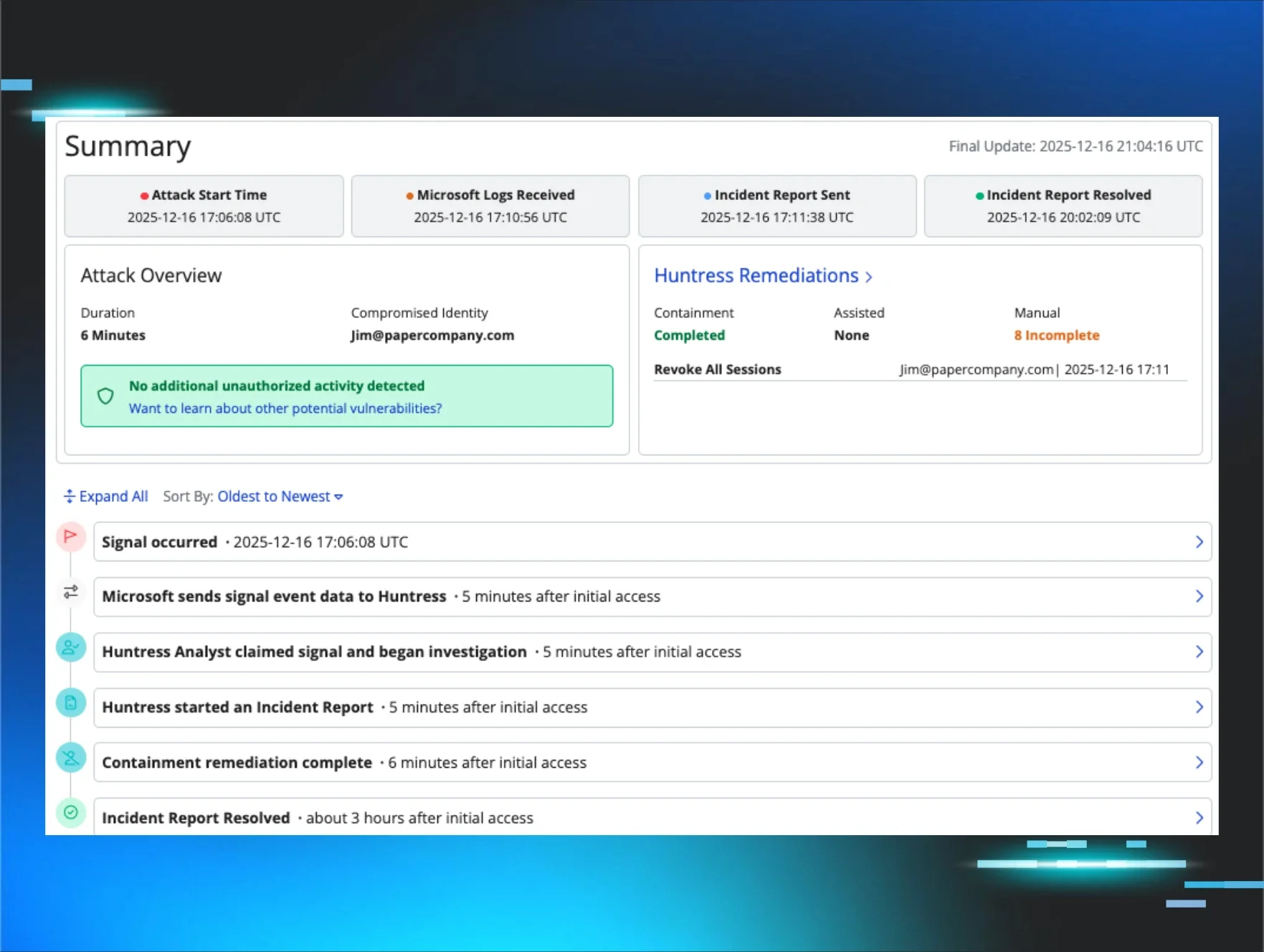
In a significant upgrade, Huntress has revamped its Managed ITDR (Incident Threat Detection and Response?) platform. This update introduces a new Incident Report Timeline feature that provides users with clear and chronological insights into security incidents. With this enhancement, security teams can now respond to threats more decisively and efficiently than ever before.

The Incident Report Timeline allows users to visualize events related to security incidents in a structured manner. This means that when an incident occurs, you can see exactly what happened, when it happened, and how it unfolded. This clarity is crucial for teams trying to mitigate threats quickly and effectively. The new feature aims to streamline the incident response process, making it easier for organizations to manage their security posture?.

Why Should You Care

If you’re part of a security team or even a business owner, understanding incidents as they happen is vital. Imagine trying to fix a leak in your home without knowing where the water is coming from. The Incident Report Timeline acts like a detailed blueprint of your security incidents, allowing you to pinpoint issues quickly.

Having access to chronological insights means you can act faster and smarter. This can help protect your sensitive data, your customers, and ultimately your reputation. The key takeaway here is that being informed about incidents in real-time can significantly reduce the impact of cyber threats? on your organization.

What's Being Done

Huntress is actively rolling out this new feature to its users. The company emphasizes the importance of quick and informed responses to incidents, which is why this update is a game-changer. Here’s what you should do if you’re using Huntress Managed ITDR:

  • Familiarize yourself with the new Incident Report Timeline? feature.
  • Train your security team on how to utilize this tool effectively.
  • Monitor incidents closely using the timeline for better situational awareness.

Experts are keeping an eye on how organizations adapt to these changes and whether this feature leads to improved incident response times in the field.

💡 Tap dotted terms for explanations

🔒 Pro insight: The introduction of a chronological timeline could set a new standard for incident response tools in the industry.


Original article from

Huntress Blog

Read Full Article

Related Pings

LOWTools & Tutorials

oledump.py Version 0.0.84 Released with Fixes

A new version of oledump.py has been released, fixing a key issue. This update enhances file analysis for cybersecurity professionals. Download the latest version to improve your malware detection efforts.

Didier Stevens·
MEDIUMTools & Tutorials

Metasploit Unveils New Modules and Pro Milestone

Metasploit has rolled out new modules for enhanced security testing. This update includes tools for reconnaissance, evasion, and exploitation. Cybersecurity professionals should act quickly to leverage these improvements and address potential vulnerabilities.

Rapid7 Blog·
MEDIUMTools & Tutorials

Microsoft Tackles Classic Outlook Sync and Connection Issues

Microsoft is addressing several sync and connection issues in the classic Outlook app. Users of Gmail and Yahoo accounts are particularly affected. This could disrupt email management for many, but workarounds are available while fixes are in progress.

BleepingComputer·
HIGHTools & Tutorials

Metasploit Pro 5.0.0: New Tools to Combat Cyber Threats

Metasploit Pro 5.0.0 has been released, offering new modules for security teams. This update is vital for protecting against evolving cyber threats. Upgrade now to enhance your defenses and stay ahead of attackers.

Cyber Security News·
HIGHTools & Tutorials

Hybrid Incident Response: Mastering Complexity with Clarity

A new approach to incident response is here! Hybrid incidents can cause chaos, affecting businesses and users alike. By standardizing communication and roles, organizations can prevent confusion and enhance security. Discover how to streamline your incident response process.

CSO Online·
MEDIUMTools & Tutorials

Firewall Upgrade: Red Access Adds GenAI Security Features

Red Access has unveiled a new security upgrade for firewalls. This upgrade adds GenAI security and browser protection, enhancing existing systems without the need for replacements. It’s crucial for protecting sensitive data against evolving cyber threats. Businesses should explore this innovative solution to bolster their defenses.

Help Net Security·